
Step 10 · about 6 minutes
Optional guide: transfer a real project
Read this for future company projects. Do not transfer your practice hello-world repository.
- For an actual project only, agree the repository and handover timing with the tech team. Confirm you have permission to transfer it into the ample-couture organization; joining alone does not guarantee this permission.
- Open the agreed repository on GitHub, then choose Settings → General.
- For that agreed real project only, scroll to Danger Zone → Transfer. Do not click this for the practice repository.
- Choose ample-couture as the new owner. Review the destination and repository name; complete the confirmation GitHub asks for. If the destination is unavailable, ask the tech team to help.
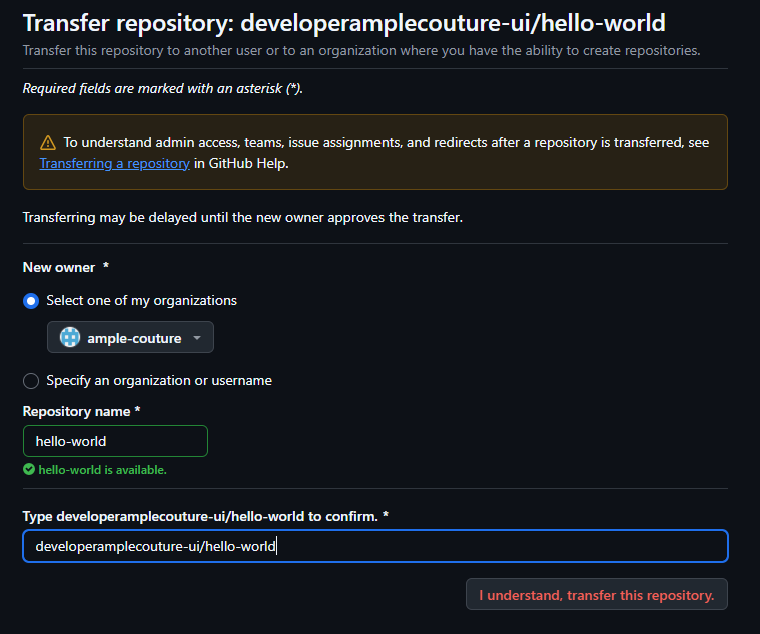
- Submit only after the tech team has approved the real-project transfer. Notify them immediately, share the repository link, and ask them to complete any approval GitHub requests.
- Verify the repository now appears under ample-couture with the tech team. Ask Claude to update the local repository’s remote address and check access. Confirm any connected services with the tech team.
Organization transfers depend on your permissions and organization rules; they do not always use the same email-acceptance flow as transfers to a personal account. Reference: GitHub repository transfers.